How to photograph a meteor shower
Head for the country and point your camera toward the sky.
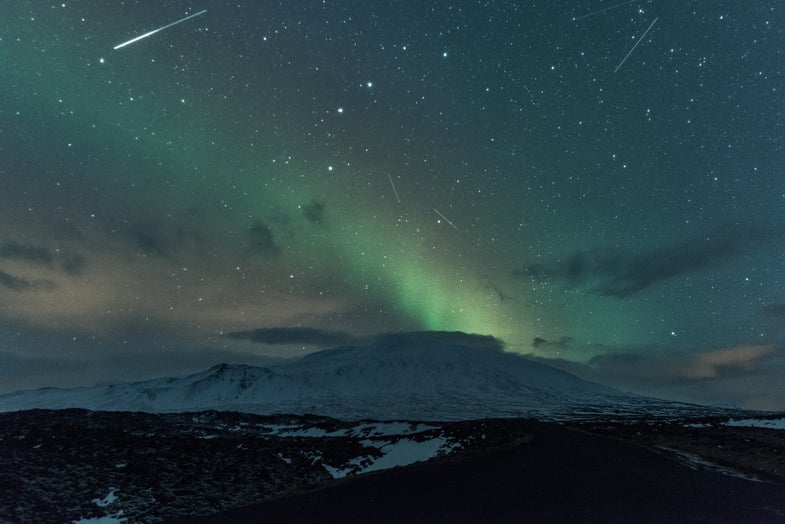
Meteor showers can be amazing things to photograph. (Here’s a NASA video explaining the phenomenon). But, before you point your camera upward, here are a few simple tips to make sure you get the most out of your night of shooting.
Find the darkest spot available
If you dwell in a big, bright city with a lot of lights, your chances of catching a worthwhile meteor image are going to be slim. You’re going to be dealing with long-exposures and wide-open apertures, which means any environmental light will creep into the frame and overpower the image. If possible, get out into the country where streetlights and neon signs are few and far between. Just be sure to pack a flashlight for navigating your gear in the dark.
Stock up on coffee (or just sneak in a nap)
The best viewing time starts around midnight, but things will start getting more exciting as the night goes on. Shooters who can stay out until the early morning hours before sunrise will be rewarded with a more active show.
Bring a cable release
Everybody knows that a tripod is an absolute must for long exposures, but the value of a good cable release is often underestimated. Keeping your finger off of the camera’s shutter button will help prevent blurred images, especially if your tripod’s head isn’t the sturdiest one around. If you don’t want to buy a cable release, you can also use your camera’s self-timer to keep your shutter finger from blurring your image.
Consider putting something in the foreground
If you fill the viewfinder with only sky, you’re going to end up with a bunch of light streaks on the frame and not much else. Experiment with putting other things in the frame, even if they’re dark (like mountains) and only create silhouettes. It will up the difficulty level, but will also probably result in more satisfying overall images. RAW capture will also help since it allows you to tweak your white balance later.
Use a wide, fast lens
Those bright little wonders won’t be in front of the lens very long, so in order to make the most of each one, it’s best to keep your aperture open wide. And because they’ll appear so sporadically, having a wider lens will greatly increase the chance that you’ll actually capture one (or more) over the course of the night.
Choose the proper ISO
Here in the day of digital, this is a simple task that can be achieved through trial and error. Each camera model react differently during low-light long exposures, so start at ISO 800 and adjust accordingly. You’re going to get some noise, but it’s best to try and avoid the obnoxious, brightly-colored pixel noise often associated with digital cameras and extremely long exposures. To help, you can try the dark frame technique described here by astronomical photographer, Jerry Lodriguss.
Determine your exposure time
Most digital cameras can easily a handle a 30-second exposure before noise starts getting out of hand. That’s a great place to start. That’s also short enough to keep stars from becoming light streaks due to the rotation of the earth.
Charge your batteries in-full before heading out
Even if your camera isn’t begging for more battery power, it’s worth topping off before heading out for a night of long exposures. With shutter times that long, you’ll find that you’ll get many fewer frames out of a single charge than you would in a normal shooting situation. Lower temperatures will also drag your battery performance down even more, so winter shooting requires even more batteries in reserve to ensure you don’t run out of juice in the field.
Know where to point your camera
The direction of the meteor paths will vary depending on a wide variety of factors, so putting in some research on Google before you head out will likely pay off greatly. One spot may work great for one meteor shower and not work at all for another. Watch for a few minutes without the viewfinder in front of your eyes to get a feel for where they’re coming from and where they’re going.
Keep shooting
Like lightning, meteors are very unpredictable, which is part of what makes capturing them with a camera so satisfying. Don’t be afraid to shoot away, one frame after another. There’s nothing more frustrating than having the shutter snap shut just a few seconds before a choice streak shoots across the sky.
