Camera Test: Panasonic Lumix DMC-G3
Good things come in small packages
We may earn revenue from the products available on this page and participate in affiliate programs. Learn more ›
Panasonic G3
If you thought the stream of new ILCs would slow down by now, you were wrong. Just a few months after Panasonic brought out its rangefinder-style Lumix DMC-GF2 camera, the company’s back at it with the mini-DSLR-style DMC-G3. And mini is definitely the operative word, since the body is smaller than any DSLR out there. Into this tiny package ($700, street, with 14–42mm f/3.5–5.6 lens) Panasonic packs a 16MP LiveMOS sensor, a 1.44 million-dot EVF, a slightly slower version of the Venus Engine FHD processor developed for the GH2, and an articulated 3-inch, 460,000-dot LCD touchscreen.
For shooters interested in a nonrangefinder Micro Four Thirds camera, the G3 offers an affordable alternative to the pricey GH2 and, as our lab tests showed, it delivers impressive image quality for your dollar.
In the Test Lab
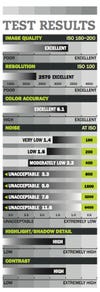
Thanks in large part to the resolving power of its newly developed sensor (not the same one as the GH2), the G3 earned an Excellent rating in overall image quality in our tests. The camera turned in 2570 lines per picture height, just edging past our 2500-line threshold for top honors in this area. Better still, it holds onto that resolution well as ISO increases: Even at its top sensitivity of ISO 6400 (where noise reached well into Unacceptable territory), the G3 resolved 2480 lines.Indeed, the G3’s noise numbers look particularly bad, and the culprit here is the version of the SilkyPix RAW processor that comes with the camera. In it, Panasonic does not increase the default level of noise reduction as ISO increases, as most other camera makers do. Even at its lowest sensitivity of ISO 160, the G3 was nearly out of our Very Low rating band; at ISO 200, it moves up to a Low rating, and by ISO 800 it reaches Unacceptable.
Given how much resolving power the G3 retains at high ISOs, you could apply more noise reduction to bring it to acceptable levels with little loss of sharpness. But will users of this camera really want to fiddle with RAW software? In most cases, we doubt it. We hope in the future Panasonic follows the lead of other manufacturers such as Olympus, which progressively increases default noise reduction in its E-PL2 to keep if well under control up through ISO 1600.
Panasonic does a wonderful job of recreating accurate colors with the G3, which earned an Excellent rating in this area with an average Delta E of 6.1 for 8-bit TIFFs converted from RAW files.
In the Field
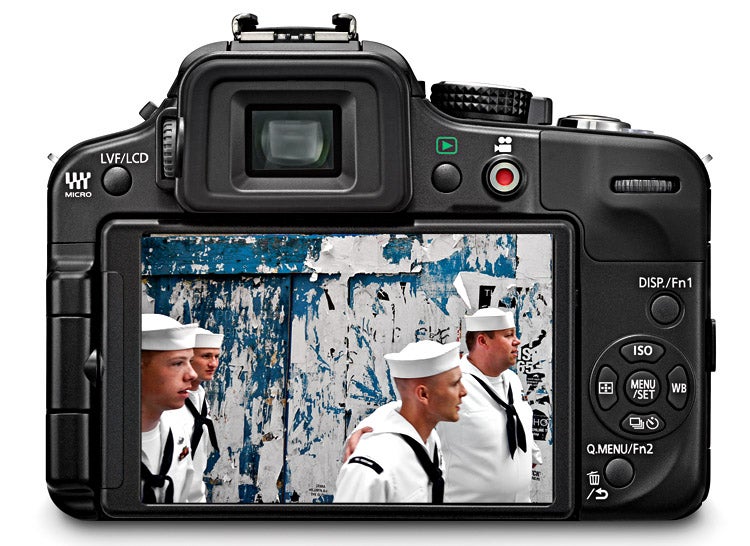
At only 1.8 inches deep (without lens), and a mere 4.5 inches wide and 3.3 inches high, the G3 is noticeably smaller than the company’s GH2, and significantly smaller than any DSLR. The G3 nonetheless manages to evoke the SLR experience. The grip is not traditional in that you don’t really grasp it with your fingers as much as you let your fingers fall down over it. Since most people’s fingers will end up wrapping down under the body, it ends up feeling secure in your hand, and with the kit lens it feels well balanced.
While the G3 has fewer external controls than the GH2, Panasonic makes good use of those it has. The menu navigation buttons serve double duty, and both the display and quick menu buttons can be customized. As usual in Panasonic G-series cameras, the clickable command wheel toggles between exposure compensation and shutter speed or aperture in their respective priority shooting modes. In manual mode, it toggles between the two variables, which is very convenient.
The camera also offers the full complement of touch controls we’ve become accustomed to, such as touch shutter, touch AF, and a full set of touch controls for all the frequently used settings found in the quick menu. Plus, if the quick menu items don’t include what you want, the G3 lets you add, swap out, or rearrange items until you set it up the way you want—all you have to do is touch, drag, and drop. And since the customize button shows up on the touchscreen whenever you access the quick menu, the process is simple. While traditionalists will likely still scoff at the notion of touch controls, the G3 certainly showcases the advantages of a rationally designed touch interface.
If a full set of camera controls isn’t your thing, or if you’re considering this camera for a less-experienced shooter, the G3 also includes Panasonic’s iA fully automatic shooting mode, as well as the semi-automatic iA Plus mode that lets you adjust things like white balance, shutter speed, and aperture using simple icon-driven sliders.
The benefits of touch also find their way into the realm of autofocusing, where you can select a subject to track by touching it on the screen. Furthermore, the new Pinpoint AF feature lets you select a very specific point in the image to focus on. Tap a spot on the screen and the camera zooms in on it; then, you can select an AF point within this zoomed-in area. This is especially useful for macro shooting, where the camera might select the wrong point in conventional AF. This mode works best with a tripod—using it while handholding the camera can be difficult.
No matter how you use AF, the G3 focuses very quickly. While we can’t perform our normal lab test for cameras with contrast-detection AF systems, we’re sure that most users will be pleased with the camera’s focusing speed in all but very dim situations. Panasonic achieves this speedy AF in part by doubling the rate of information readout from the sensor from 60 frames a second to 120 fps when autofocusing. Doing so constantly would generate too much heat, according to the company, so it occurs only for AF, not during video or image capture.
Burst shooters can choose between 4 fps at full resolution or 20 fps with the pixel count reduced to 4MP. In the second mode, the camera leaves the mechanical shutter open and samples from the sensor, the way most compact cameras do. With either mode, you can shoot an unlimited number of JPEGs until your card is full, or up to 7 RAW frames. As with any EVF camera, the finder blanks out during bursts, so if you want to pan along with a subject, you may find it difficult compared with using a DSLR’s optical finder.
HD video from the G3 looks very nice, with a top resolution of 1920×1080 pixels at 60 interlaced frames per second. If you prefer progressive capture, you can step down to 1280×720 pixels at 60p. Continuous AF is available during capture, and you can also use touch tracking to select a subject to follow. While there is a built-in stereo mic atop the camera, there’s no mic input. Serious videographers interested in a Panasonic ILC still have to look to the GH2 for that.
The Bottom Line
Once again, Panasonic has created a very impressive ILC in the G3, combining fine imaging with a well-evolved touchscreen experience. Users who want to exploit RAW shooting should take some time to experiment with noise reduction.
If you’re not that type, but still want to shoot RAW, you might consider the Olympus Pen E-PL2, a camera that also gives you sensor-shift image stabilization that works with any lens.
The G3’s kit lens is stabilized, though, and for general shooters looking for a DSLR-style ILC at a modest price, the G3 would be a good choice.
Specifications
Imaging: 16.0MP effective, Four Thirds-sized, LiveMOS sensor captures images at 4592×3448 pixels with 12 bits/color in RAW mode.
Storage: SD, SDHC, SDXC. Stores JPEG, RW2 RAW, RAW + JPEG, and MPO (with optional 3D lens) files.
Video: Up to 1920×1080 pixels at 60i fps in AVCHD format with 17 Mbps average bit rate or up to 1280×720 pixels at 30p fps in Motion JPEG format; built-in stereo mic, no mic input; contrast detection AF with continuous AF.
Burst Rate: Full-sized JPEGs (Fine mode): 4 fps up to card capacity. RAW (12-bit): 4 fps up to 7 shots.
AF system: TTL contrast detection with 23 focus areas. Single-shot and continuous AF with tracking and face detection.
Shutter speeds: 1/4000 to 30 sec, plus B (1/3-EV increments). Shutter life not rated.
Metering: TTL metering using 144-zone multi-pattern with Intelligent Multiple (evaluative), centerweighted, and spotmetering; 0–18 EV (at ISO 100, f/2).
ISO range: ISO 160–6400 (in 1/3- or 1-EV increments).
Flash: Built-in pop-up with TTL autoflash, GN 35 (ISO 100, feet), covers field of view of 14mm lens; flash sync to 1/160 sec; dedicated Panasonic hot-shoe.
EVF: Fixed eye-level LCD with 1.44 million-dot equivalent resolution, 100% accuracy, and 1.4X (0.7X 35mm equivalent) magnification.
LCD: Tilting, swiveling 3-in. TFT touchscreen with 460,000-dot resolution.
Output: Hi-Speed USB 2.0, mini HDMI video, composite video.
Battery: Rechargeable DMW-BLD10PP Li-ion, CIPA rating, 270 shots with 14–42mm kit lens, 250 shots with 42–200mm optional zoom lens.
Size/weight: 4.5×3.3×1.8 in., 0.84 lb with a card and battery.
Street price: $600, body only; $700 with G Vario 14–42mm f/3.5–5.6 Mega OIS zoom lens.
**Info: **www.panasonic.com