DSLR Test: Canon EOS Rebel T3
A new starter model that should convert more than a few point-and-shooters
We may earn revenue from the products available on this page and participate in affiliate programs. Learn more ›
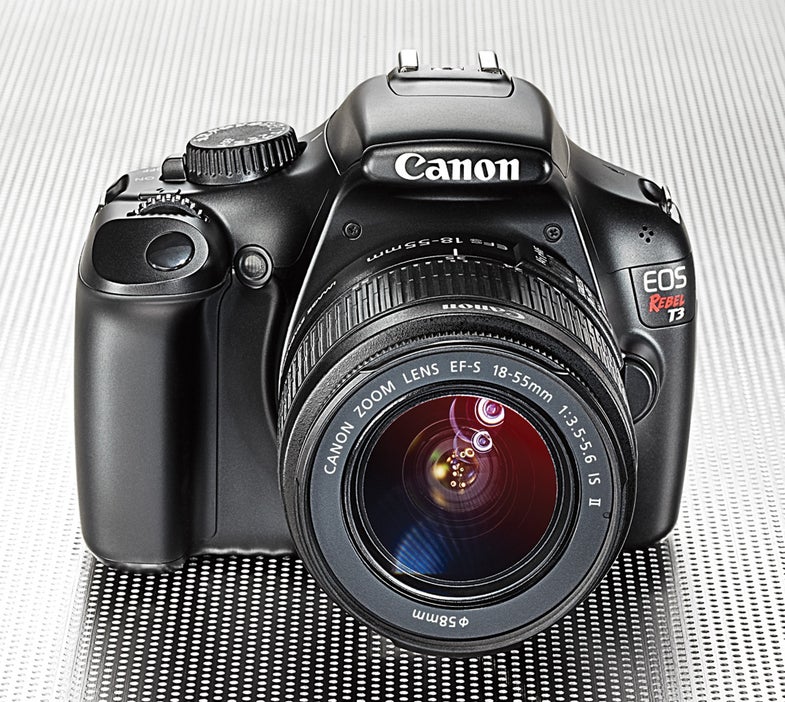
It’s been years since Canon introduced a basic entry-level DSLR. In that time frame, video has become commonplace in DSLRs, and interchangeable-lens compacts (ILCs) now compete for the attention of people looking to step up from a point-and-shoot. With its APS-C sized CMOS sensor, 1280×720 30p video recording, new 63-zone metering system, and speedy phase-detection autofocus, the EOS Rebel T3 ($600, street, with 18–55mm f/3.5–5.6 EF IS II lens) makes a great case for going with a DSLR.
In the Test Lab
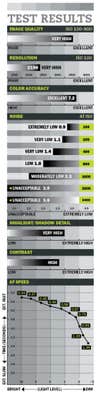
Like most cameras at this price, the T3 sports a 12.2MP sensor and squeezes a lot of resolving power out of it. In our test, the Rebel yielded 2190 lines per picture height for a Very High rating. That puts it close to some of its rival DSLRs, Pentax’s K-r (2270 lines) and Sony’s Alpha 390 (2200 lines). Among ILCs, the Olympus Pen E-PL2 turned in 2260 lines and Panasonic’s Lumix DMC-GF2 2300 lines.
While these numbers might make the Rebel T3 seem less than impressive, its noise results rebalance the scale. In our tests, it kept images squeaky clean at ISO 100, earning an Extremely Low rating. Of these rivals, only the Olympus matched it. And the T3 barely reached the lower limit of our Unacceptable rating at ISO 3200 and even ISO 6400. So, with a very modest increase over the default noise-reduction settings, you can keep noise to acceptable levels no matter what ISO you shoot. Given that at its default setting at ISO 6400 it resolved 2100 lines, cranking NR way up will still let you retain a lot of detail in your pictures.
The competition doesn’t fare so well here: The Sony A390, whose sensor tops out at ISO 3200, was able to resolve only 1870 lines at that sensitivity with its default noise reduction. At its default settings, the Olympus E-PL2 ended up with 2010 lines at ISO 6400, with noise 2.4 points higher than the Canon. Similarly, Panasonic’s GF2 achieved 2060 lines at its default settings at ISO 6400, but as it was extremely noisy at this ISO, significant resolution would be lost if you tried to bring it down to the T3’s noise level.
Of all the competition, Pentax’s K-r provides the biggest challenge in this balancing act, maintaining acceptable noise up to ISO 3200 while resolving 2270 lines. And with a slight increase in noise reduction, it can keep noise to acceptable levels at ISO 6400 while resolving more than 2200 lines.
Where the Rebel wins is in its autofocus speed in moderate and dim light. While ILCs have gotten better at AF, especially in bright light, they still lag behind DSLR phase-detection systems in low light. The T3 focused in less than a second all the way down to EV 0, equivalent to a dim night scene. While Canon rates the T3’s 9-point (all cross-type) AF system to function down only to EV 0, it focused reliably (though inconsistently in speed) down to EV –2 in our tests.
In the Field
The T3 performed well in our field testing, with excellent results from the metering system and AF, and an overall pleasing control scheme for such a low-priced model.
Relatively light and well balanced with its kit lens in place, it maintains the ergonomic conveniences of DSLR design. The grip is deep enough to give you something solid to hold onto, and the rubber on the grip and back, though extremely smooth, provides enough tactile resistance for most casual shooting.
Like most entry-level DSLRs, the T3 has a single command wheel located near the shutter button. Another nod to its bargain status: the use of a pentamirror rather than the costlier, and typically brighter, pentaprism. Though it covers a hefty portion of the frame (95%), the finder’s 0.8X magnification makes it a tad claustrophobic.
While many of the T3’s controls are menu-driven, Canon makes the most of the buttons it has fit on the back. The directional buttons for navigating the menus serve double duty to access ISO, AF, drive mode, and white balance. Uniquely shaped buttons are arrayed around these—while they’re nearly flush with the camera, their shapes make them easy to distinguish by feel.
On the 2.7-inch, 230,000-dot fixed LCD, the user interface divides into a main menu and a quick menu. The former holds settings that mostly won’t be changed frequently, such as image quality and color space. The quick menu, reached by the Q button, has a control-panel look similar to that of most DSLRs these days. You can navigate with the direction buttons, using the command wheel to change a setting. Though fast and convenient, this forces you to look at the LCD—less sophisticated than the controls on some higher-end DSLRs, where ample physical controls let you shoot without taking your eye off your subject. Still, for its class, it does a great job.
If you want rapid-fire bursts, the T3 may not be for you. It tops out at 3 frames per second for JPEGs—sluggish even for this class—up to card capacity. The rate slows to 2 fps for up to 5 RAW images, or 0.8 fps for one RAW + JPEG shot. Burst performance is almost always best when capturing JPEGs alone, since these smaller files write faster to a memory card. Competition? The Pentax K-r, at 6 fps, is much quicker, but tops out at 25 JPEGs or 12 RAW. So while the K-r rules for RAW shooters, if you want longer bursts, the T3’s nearly unlimited JPEGs might serve you better. While we would’ve liked a faster burst speed, for the shooters this camera is aimed at, the T3’s speedy AF will be more of a boon.
It would’ve been nice for Canon to have included full HD video capture as it does in all its other DSLRs, although for casual video capture, 720p should be fine for most users. We also wish that Canon made the custom-functions menu more prominent, as on its higher-end models. Again, entry-level DSLR users may be less prone to customizing their cameras, but that’s no reason to make the custom functions harder to find.
Bottom Line
The Rebel T3 is a very attractively priced entry-level DSLR that provides solid performance and value. Its resolving power, low noise, relatively speedy AF, and well-designed controls should help ease novice shooters into the world of DSLRs.
Indeed, the T3’s strengths make the case for DSLR performance over the convenience of an ILC’s smaller size. While its image quality comes close to some of the ILCs on the market, its autofocus still beats the systems found in ILCs once the lights get dim, as is often the case indoors. Its optical viewfinder, while not the best of its kind, is still a more pleasing experience than the EVFs that ILCs use. Finally, the wide array of lenses available from Canon and from third-party lensmakers far outstrips what is currently available for any ILC.
Taking all of these factors into account, we can say without hesitation that the Canon EOS Rebel T3 is a DSLR bargain and a worthy introduction to a full camera system.
Specifications:
Imaging: 12.2MP effective, APS-C-sized, CMOS sensor captures images at 4272×2848 pixels with 14 bits/color in RAW mode.
Storage: SD, SDHC, SDXC. Stores JPEG, CR2 RAW, or RAW + JPEG files. Video: Records up to 1280×720 pixels at 30p fps in MPEG-4 H.264 format with variable average bit rate; built-in monaural microphone; no microphone input; AF same as live view shooting.
Burst rate: Full-sized JPEGs (Fine mode), up to card capacity at 3 fps; RAW, up to 5 shots at 2 fps (14-bit); RAW (14-bit) + JPEG, up to 1 shot at 0.8 fps.
AF system: TTL phase detection with 9 illuminated focus points (all cross-type with single dual-cross at center); single-shot, predictive AI Focus tracking; tested sensitivity down to EV –2 (at ISO 100, f/1.4), although Canon rates sensitivity to EV 0.
Live view: Full-time contrast detection or single-shot phase detection AF with mirror interrupting view momentarily.
Shutter speeds: 1/4000 to 30 sec, plus B (1/3-EV increments); shutter life not rated.
Metering: TTL metering using 63-zone evaluative, centerweighted, and partial (approx. 10% of finder at center); range, 1 to 20 EV (at ISO 100).
ISO range: ISO 100–6400 (in 1-EV increments).
Flash: Built-in pop-up with TTL autoflash GN 30 (ISO 100, feet), covers 17mm lens. viewfinder: Fixed eye-level pentamirror.
LCD: 2.7-in. TFT with 230,000-dot resolution.
Output: Hi-Speed USB 2.0 and mini-HDMI video.
Battery: Rechargeable LP-E10 Li-ion; CIPA rating, 700 shots with optical viewfinder, 220 shots with LCD screen in live view still shooting, approximately 110 min. for video.
Size/weight: 5.1×3.9×3.1 in., 1.10 lb with a card and battery.
Street price: $600 with EF-S 18–55mm f/3.5–5.6 IS II zoom lens.
Viewfinder: Accuracy, 95% (Excellent); Magnification, 0.80X (Very Good).
Info:www.canoneos.com