Hands-On Impressions: Fujifilm Real 3D W3
We spend some quality time with Fujifilm's new 3D compact camera.
We may earn revenue from the products available on this page and participate in affiliate programs. Learn more ›
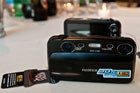
fujifilm w3 main
Surrounded by 3DTVs and reconstructed skeletons of prehistoric creatures at New York’s Museum of Natural History, last night we spent some hands-on time with Fujifilm’s latest 3D compact. Having tried out all of its new features, as well as the ones that have been carried over from last year’s Real 3D W1, it’s fair to say that this is a big step forward.
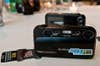
The first thing you’ll notice when picking the camera up is how compact it is. The elongated body shape makes it easy to fit in a pocket, but also makes it a little unwieldy to hold when shooting. The flush lenses don’t extend from the body, and the rightmost optics are extremely close to the shutter button, which means the traditional one-handed grip is pretty much out of the question. Unfortunately, it’s also fairly easy to get your index finger in front of the left lens, especially if you have large hands. Expect your fingers to make some cameos in your shots, at least until you’ve nailed down the perfect position for holding it.
The Screen:
Perhaps the most intriguing part of the whole device is the 3.5-inch 3D screen that doesn’t require glasses for the three dimensional experience. We found it to be fairly similar to the screen on the W1, although the W3’s display was slightly brighter than we had expected going in. Getting the 3D effect just right is crucial and requires a dead-on viewing angle. Even a couple degrees askew and you’ll be looking at a flat image.
It takes a few seconds for your eyes to adjust to the 3D effects, but we found that the parallax adjustment (which is controlled by a zoom-like switch on the upper left part of the camera) was very useful when it came to getting the right amount of perceived depth. During playback, photos looked crisp and clear, but videos seemed a little stuttery, even after tweaking.
3D Stills:
Put the camera in Auto mode and it’s ready to start capturing 3D pictures that are recorded in .MPO format, each of which checks in around 7MB. The autofocus is impressively snappy, at least for a camera with two lenses. But, composing a shot with the camera anywhere except eye-level can be difficult because of the limited viewing angle of the screen.
In order for the 3D effect to actually work, the subject must be at least 6-feet or so from the camera. We did some experimenting with closer focusing and things really did get out of whack. A photograph of some wine glasses from about 2 feet away looked more like an optical illusion.
3D Video:
Being able to add HD 3D video to a $500 camera is a win for Fujifilm. When you consider that there’s hardly any 3D content for early adopters to watch on their new 3D-capable TVs, it puts them in a good position. You’ll need a 3DTV if you actually want to watch the footage, because trying to watch it on the back of the camera is slightly less than satisfying. But, once you put on the glasses and watch your stuff on the big screen (via the camera’s Mini HDMI port), it actually looks quite good. Again, the more separation between camera, subject and background, the happier you’ll be with the outcome.
2D Stills:
Because Fujifilm knows that you won’t always want to shoot 3D, they added on some “advanced 2D” functions that make use of both lenses and sensors. One mode allows you to shoot at two different focal lengths at the same time, so you can get a close-up and a wide shoot simultaneously. Another offers separate color settings from each lens. The last A2D mode lets you shoot with two ISOs (400 and 1600) at the same time. While the focal length and ISO modes could be useful, we found the dual-color mode to be kind of a throw-away. Separately, the 10-megapixel CCDs don’t crank out the highest image-quality. It’s not bad, but it’s also not up to par with what you get from a high-end, or even some mid-level, compact cameras.
Viewing:
As stated before, the best way to view anything you shoot with the W3 is on a big 3DTV using active shutter glasses. Any home theater geek will tell you that 3D is meant to be experienced on a large scale in order to make it feel immersive. Photos look fine on the back of the camera, while videos leave something to be desired. You can also order 5″x7″ prints of your 3D photos for $6.99 each. The display prints they had on-hand looked good, providing plenty of depth. We have a few of our own from the demo on-order and we’ll update you on our impressions once they arrive.
Verdict:
Ultimately, the W3 is an improvement over the W1. Where the W1 seemed to be aimed at photographers looking for a new gimmick, it seems that the W3 is aimed directly at the content-starved group of 3DTV owners. In that context, the $500 price tag makes a lot more sense. Someone who has already spent thousands on a 3D panel may not mind dropping another $500 to actually make use of its defining feature. For photographers, however, 3D still finds itself in the realm of novelty. The prints are relatively small and pricy and sharing 3D photos is still just about impossible if you’re not within eyeshot of your intended audience. But, with all the support for 3DTVs going on right now, Fujifilm could find themselves in a very good place if 3D catches on in the way some think it will.